
Can Employers Detect Mouse Jigglers? Yes — Here's How
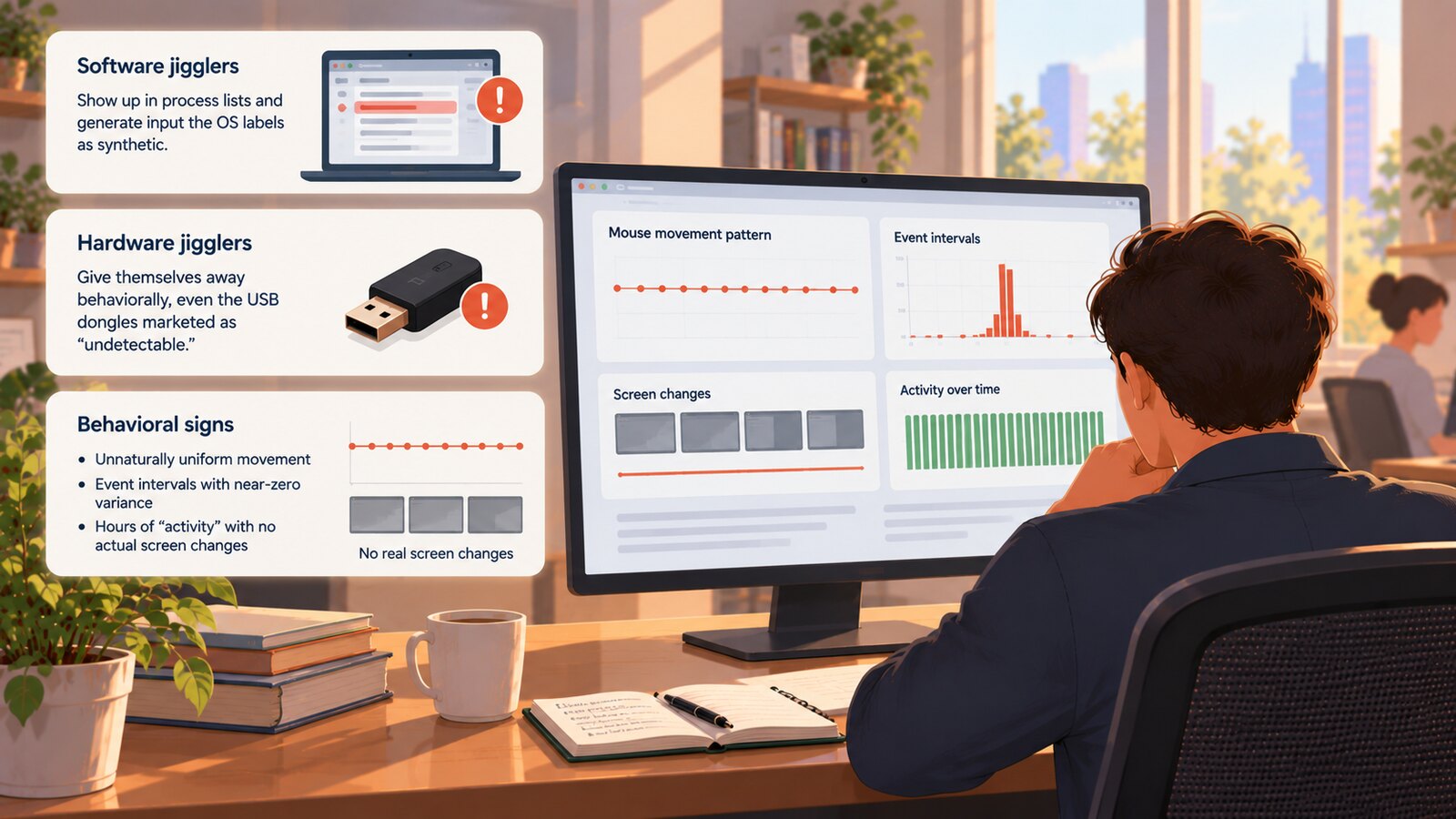
Yes — employers can detect mouse jigglers, including the USB hardware dongles marketed as "undetectable." Software jigglers show up in process lists and generate input the operating system labels as synthetic, while hardware jigglers give themselves away behaviorally: unnaturally uniform movement, event intervals with near-zero variance, and hours of "activity" during which the screen never actually changes. Detection is no longer hypothetical — in 2024, Wells Fargo fired more than a dozen employees over simulated keyboard activity. The real question for both sides is what happens after detection: a fair process treats a flag as a question for a human, not a verdict from a machine.
The Wells Fargo firings: when jiggler detection went mainstream
In June 2024, Wells Fargo disclosed in regulatory filings that it had discharged more than a dozen employees in its wealth and investment management division after reviewing allegations of "simulation of keyboard activity creating impression of active work," as CBS News reported. Because the staff were registered with FINRA, the terminations became part of their permanent regulatory records — a consequence wildly out of proportion to the roughly $20 gadget that likely caused it. As Forbes noted at the time, the firings landed amid a wider post-pandemic push by employers to distinguish genuine remote work from the appearance of it.
The episode settled the headline question in the most public way possible. Companies are not merely logging activity; they are separating real activity from fake activity — and acting on the difference.
How software mouse jigglers are detected
 Learn how SCREENish saves you money
Time tracking with screenshots, honest reports and hands-off payroll. Free to try — no credit card.
Start free →
Learn how SCREENish saves you money
Time tracking with screenshots, honest reports and hands-off payroll. Free to try — no credit card.
Start free →
Software jigglers — free utilities that wiggle the cursor or tap a phantom key on a timer — are the easiest category to catch, for three reasons.
They show up in software inventories
On a company-managed computer, IT asset management and endpoint tools keep a running record of installed applications and active processes. A process named after a well-known jiggler utility is self-incriminating, and even renamed copies can be identified by their file signatures.
The operating system labels injected input
Modern operating systems distinguish input that arrives from a physical device driver from input synthesized by software. On Windows, for example, events created through the SendInput API carry an "injected" marker that monitoring agents can read. A software jiggler cannot avoid this: every fake movement it generates is stamped as programmatic at the moment it is created.
Managed devices can simply block them
Many corporate laptops enforce application allow-listing, which prevents unapproved executables from running at all. On those machines a software jiggler never gets the chance to jiggle — but the download attempt may still be logged.
Why "undetectable" hardware jigglers get caught anyway
This is where most searchers land: if the software route is closed, does a USB dongle work? Hardware jigglers plug into a USB port and present themselves as a generic mouse, so the operating system sees what looks like real hardware input. That is the entire basis of the "undetectable" marketing claim, and as far as it goes, it is true — no process scan will find a dongle, as guides like Tom's Hardware point out. The problem for jiggler users is that detection stopped relying on process scans years ago. Three behavioral signals expose hardware devices reliably.
Unnaturally uniform input cadence
Human input is messy. People move the cursor in bursts, pause to read, overshoot targets and correct, scroll at irregular speeds, and type in ragged rhythms. A hardware jiggler is a microcontroller running a loop: it emits movement events at fixed intervals, along fixed or shallowly randomized paths, with timing variance close to zero. Statistically, an afternoon of dongle output looks nothing like an afternoon of human output. Even devices that advertise "random" movement patterns draw from a small repertoire that repeats — and repetition over hours is exactly what pattern analysis is built to find.
Activity with no screen change
The strongest tell requires no input analysis at all. Screenshot-based time tracking, including SCREENish's mouse jiggler detection, captures periodic screenshots during tracked time. A jiggler produces hours of "active" input while the screen stays frozen: no windows open or close, no documents scroll, no text appears, no application ever changes. Real work leaves visual evidence; a wiggling cursor over a static desktop is a contradiction that is obvious the moment anyone looks.
The USB connection leaves a permanent trail
Operating systems keep a history of every USB device ever attached, including vendor and product identifiers and first-installed and last-connected timestamps. An unfamiliar generic input device that connects at nine and disconnects at five is evidence that survives long after the dongle is unplugged, and endpoint security tools on managed machines log new device connections in real time.
| Jiggler type | How it works | Primary detection vectors |
|---|---|---|
| Software utility | A program moves the cursor through OS APIs | Process and software inventories, injected-input markers, application allow-listing |
| USB hardware dongle | Poses as a generic mouse and emits movement events | Uniform cadence and zero-variance intervals, screenshots showing no screen change, USB device history |
| Physical trick (mouse resting on a watch face or fan) | The optical sensor reads real motion beneath the mouse | Repetitive movement pattern combined with zero interaction with any application |
Which time trackers detect mouse jigglers?
As of October 2026, eleven of the tools buyers usually shortlist document some form of mouse jiggler detection: ActivTrak, CurrentWare, EmpMonitor, HiveDesk, Hubstaff (through its Insights add-on), Insightful, Kickidler, Monitask, SCREENish, Teramind and Time Doctor. They do not catch the same things. Some match against a list of known jiggler programs, some look for movement too regular to be a hand, some rely on screenshots that never change, and only a few look at USB devices. Clockify, Toggl Track, Jibble, DeskTime and TimeCamp do not advertise it. The differences, with each vendor documentation page linked, are in our comparison: Which time trackers detect mouse jigglers?
What happens after detection — when it's done fairly
Detection is the easy half of the problem. The hard half is what an employer does with a flag, because unusual input is suspicion, not proof.
Plenty of legitimate setups produce input that looks synthetic. Remote-desktop and VDI sessions relay keystrokes and mouse events with artificial timing. Accessibility software generates programmatic clicks by design. Presentation remotes, drawing tablets and macro keys all produce input signatures a naive detector could misread. Firing someone over a raw anomaly score would be indefensible.
This is why SCREENish routes every flag through Activity Review instead of acting on it automatically. When a stretch of tracked time resembles auto-clicker or jiggler output, it becomes a card in a review queue that explains exactly what triggered the flag, alongside the screenshots from the same period. A manager then chooses one of three actions: confirm, dismiss as a false positive, or request more information from the employee. When the system finds a legitimate cause — a remote-desktop session is the classic example — the card is labeled with a benign explanation and a warning to check before acting. No time is rejected and nobody is penalised unless a human reviews the evidence and decides. Detection produces a question for a person, not a verdict from a machine — and any employer evaluating monitoring tools should demand exactly that standard.
For employees: why a jiggler backfires
If you are tempted by a jiggler, it is worth being clear-eyed about the trade. The device solves a cosmetic problem — a green activity indicator — while creating a serious one. Activity without output is a gap that widens every week, and when it surfaces, "I faked my activity data" converts a performance conversation into a misconduct case. Most companies treat falsified time records as grounds for immediate dismissal, and in regulated industries, as the Wells Fargo employees learned, the record can follow you to your next job. Jigglers are also a common tell in overemployment situations, where flagged fake activity invites far broader scrutiny than a quiet afternoon ever would.
The honest alternative usually works better than people expect. If you are running a jiggler because reading, thinking or phone calls get counted as idle time, that is a measurement problem worth raising with your manager — reasonable tracking policies account for legitimately mouse-free work. Faking the metric just guarantees the metric stays broken.
For employers: policy plus verification, not surveillance theater
Catching jigglers is not a goal in itself. A sensible program looks like this:
- Disclose monitoring and define the offence. Tell people what is tracked and state plainly that simulating activity is a falsification of time records. Ambiguity helps no one, and disclosure requirements vary by jurisdiction.
- Never automate punishment. Every flag should reach a human who sees the evidence and the possible benign explanations before anything happens to anyone's pay or record.
- Check output first. If someone's work is on time and good, an odd activity graph is a reason to check your instrumentation, not to open an investigation.
- Prefer verification over volume. More surveillance does not mean better information. A tool that captures context — screenshots, input patterns and system signals together — and flags contradictions for review beats one that reduces a workday to a percentage.
The lesson of the mouse jiggler era cuts both ways. Employees who fake activity and employers who blindly trust activity graphs are making the same mistake: treating a proxy metric as the work itself. Detection tools have made the fakery a losing bet — the Wells Fargo firings proved that. What separates a well-run team from surveillance theater is what happens next: measurement done openly, flags reviewed by humans, and innocent explanations heard before anyone acts.