
Proxy Workers: How to Tell If Someone Else Is Doing Your Remote Employee's Job
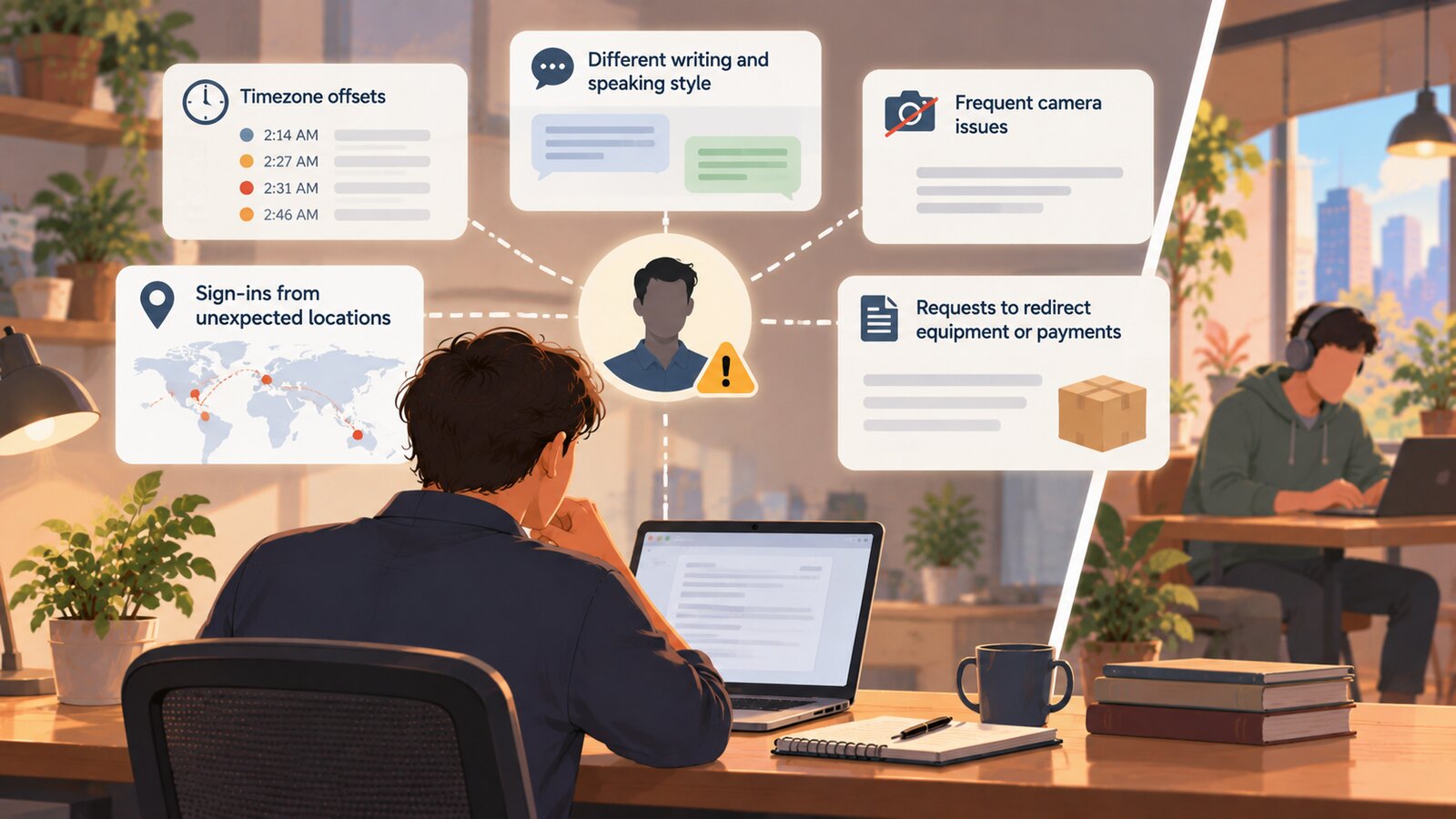
You find out someone else is doing your remote employee's job by reading the metadata their work already leaves behind, not by buying a product. The strongest signals cost nothing: the timezone offsets embedded in commit and message timestamps, a widening gap between how the person writes and how they speak on camera, a steady escalation of reasons the camera cannot be on, sign-ins from origins that do not match the stated home address, and requests to redirect equipment or payments after the offer was signed. Every one of those is already in systems you own.
The reason this article exists is that almost nothing else on the subject covers it. The vendor landscape is built around the interview and the first week of employment, and then it stops.
A short history of the problem
In January 2013, Verizon's risk team published a case study about a US software developer they called Bob. His employer had called them in because VPN logs showed a daily open session originating in Shenyang, China, using the credentials of the company's best programmer — while the programmer was visibly sitting at his desk. The Register's contemporaneous write-up records what the investigation found: Bob had subcontracted his own job to a Chinese consultancy for roughly a fifth of his six-figure salary, couriered them his two-factor token, and spent his days on Reddit and eBay. The detail that should make any manager uncomfortable is not the fraud. It is that his performance assessments rated him the firm's top coder for many quarters, and considered him an expert across seven languages.
Bob was a curiosity in 2013. He is a category now, and the category has a state sponsor.
The verification cliff
 Learn how SCREENish saves you money
Time tracking with screenshots, honest reports and hands-off payroll. Free to try — no credit card.
Start free →
Learn how SCREENish saves you money
Time tracking with screenshots, honest reports and hands-off payroll. Free to try — no credit card.
Start free →
Identity assurance in remote hiring is a point-in-time snapshot taken before any work has happened. That is the whole problem, and it is structural rather than a failure of any particular product.
Consider what actually exists, and when each thing runs:
| Layer | Representative vendors | When it runs | What it proves afterward |
|---|---|---|---|
| Interview proctoring | Talview and similar assessment-proctoring vendors | During assessments and interviews | That a face matched an ID at interview time |
| Identity proofing and I-9 | Document-backed IDV providers | Offer stage through the first days of onboarding | That documents were examined once, on one date |
| Background screening | Traditional CRA vendors | Pre-hire | That a legal identity has a history |
| Productivity and time tracking | Monitoring vendors, including SCREENish | Continuously, after hire | What a machine did — not who was at it |
Talview's own candidate verification page is a fair example of the pattern: face and voice matching, device detection, ID and watchlist checks, all framed around the recruitment lifecycle. There is no post-hire claim on the page, because post-hire is not what the product is for.
The onboarding layer has the same shape, and in the US it is written into law that way. The alternative procedure authorized in July 2023 (88 FR 47749) lets employers who are participants in good standing in E-Verify examine identity documents through a live video interaction instead of in person. It is a genuine modernization. It is also a single event, completed within days of the start date, with no mechanism that revisits the question later. Nothing in the I-9 process asks whether the person doing the work in month four is the person who held up the passport in week one.
Call that gap the verification cliff. Assurance is high on day one, decays from day two, and no vendor category owns the decay.
Why the cliff is being exploited at scale
Two things changed. The first is that faking a face got cheap. Unit 42 published a demonstration in April 2025 in which a single researcher with no image-manipulation experience, limited deepfake knowledge and a five-year-old computer built a usable synthetic interview identity in 70 minutes.
The second is that a nation state industrialized it. Microsoft tracks North Korea's remote IT worker operation as Jasper Sleet, and describes operators using face-swap tooling to insert their faces into stolen identity documents, voice-changing software to mask accents in interviews, and commercial VPNs plus remote management tools to make a laptop in Asia look like a laptop in Ohio.
The physical layer of that scheme is the laptop farm, and the leading US case is well documented. Christina Chapman of Arizona was sentenced on 24 July 2025 to 102 months in prison for hosting company-issued laptops at her home so that overseas workers could appear to be based in the United States. Reporting on the sentencing puts the scale at 309 US companies, 68 stolen US identities, roughly 17 million dollars in revenue, more than 90 laptops seized from her house in an October 2023 raid, and 49 devices shipped abroad. The Justice Department's own announcement is published here.
Chapman was not an outlier. A coordinated action announced in June 2025 covered searches of 29 known or suspected laptop farms across 16 states, with about 137 laptops seized in a single June sweep and more than 100 US companies infiltrated. In one case the workers reached source code and ITAR-controlled data at a California defense contractor.
Ordinary proxy arrangements are more common than espionage, and the market research points the same way. Gartner's July 2025 research, summarized by HR Dive, predicts that one in four candidate profiles will be fake by 2028, and reports that in a survey of 3,000 candidates, 6 percent admitted to interview fraud — either impersonating someone else or having someone impersonate them.
The signals that cost nothing
Rank these first, because they are free, they run continuously, and they do not require your employee to install anything new.
1. Timezone offsets in timestamps
This is the single best signal, and it is the most overlooked. A Git commit does not merely record a moment — it records the committer's local UTC offset at that moment. The same is true, in various forms, of ticket transitions, document edits, calendar responses and chat activity. Someone claiming to work from Denver whose commits carry an offset consistent with Asia has produced a machine-generated contradiction of their own cover story.
The shape of the activity matters as much as the offset. GitLab's threat intelligence team, in a February 2026 report on North Korean tradecraft, documented operators working from consumer VPNs, dedicated VPS infrastructure and probable laptop farm IP ranges — an infrastructure layer whose whole purpose is to make the network origin lie while the timestamps quietly keep telling the truth.
Activity calendars are worth reading for the same reason. Work stops on the days people around you take off, and those days differ by country. A contractor whose output goes quiet on dates that match the working calendar of a place they do not claim to be in, and stays busy through the holidays where they say they live, is worth a question. This one needs months of history before the shape means anything.
2. Tone drift between live speech and async writing
A proxy arrangement almost always splits the person you interviewed from the person who does the work. The seam shows up in register. The candidate who was fluent, colloquial and quick on video writes pull request descriptions in stiff, formal, oddly templated prose — or the reverse: hesitant on camera, unusually polished in writing.
Judge this qualitatively and over time, never from one sample. Non-native speakers are frequently more precise in writing than in speech, which is normal and not evidence of anything. What you are looking for is a persistent split with no plausible explanation, especially one that appeared after the hire rather than being present throughout.
3. Camera-off escalation
The FBI's IC3 advisory on North Korean IT workers (Alert I-072325-4-PSA, 23 July 2025) is explicit about this. Its recommendations include mandating video with unobscured backgrounds, capturing images for comparison against future meetings, and asking the person to wave a hand in front of their face, which IC3 notes may prompt a malfunction in AI-generated video. Unit 42 lists that gesture among the movements that are hardest for deepfake software to sustain, alongside profile turns and rapid head movements, and observes that passing a hand over the face appears to be the most disruptive of them because it breaks facial landmark tracking.
The pattern to watch is escalation, not a single absence. Camera works fine in week two; by week eight there is always a bandwidth problem, a broken webcam, a preference for audio-only. Microsoft's guidance flags workers who have never been seen on camera or seen only a few times, and those who repeatedly report video or microphone issues that prevent participation.
4. Origin changes and impossible travel
Sign-in location history is already in your identity provider. Microsoft's April 2026 detection guidance reports a spike in impossible-travel alerts on new hires specifically in the first months after onboarding, and recommends prioritizing alerts on new-hire accounts involving anonymous proxies and unexpected locations.
Treat this as an input, not a verdict. VPNs, travel and mobile carrier routing generate false positives constantly. What is meaningful is a durable change in the modal origin — the place the account signs in from most days — rather than any individual outlier.
5. Delivery-address and payment-account changes after the offer
This one is nearly free and disproportionately informative. The IC3 advisory recommends shipping equipment only to the verified address, requiring additional documentation if the employee asks for a different one, comparing payment accounts across employees for shared documentation, and watching for employees who change bank accounts frequently. A change of laptop delivery address between offer acceptance and shipment is the exact moment a laptop farm is inserted into the chain.
6. Remote-access tooling appearing on the endpoint
If a stand-in is driving a machine that physically sits somewhere else, something has to bridge the gap. Microsoft names JumpConnect, TinyPilot, RustDesk, TeamViewer, AnyViewer and AnyDesk as tools installed on issued laptops immediately after delivery, and SpyCloud's January 2026 analysis found DPRK-linked personas holding accounts for exactly that class of software, alongside reused password patterns spanning supposedly separate identities.
Remote access has entirely legitimate uses — IT support, home lab setups, a developer working from a tablet. Its presence is a question, not an answer.
7. Knowledge that does not persist
The cheapest human check there is: ask about a decision the person made three weeks ago, unannounced, in a live conversation. Proxy arrangements leak here because context does not transfer cleanly between the person on camera and the person doing the work. Someone who wrote the code remembers why they rejected the other approach. Someone relaying a summary does not.
Ranking the signals honestly
| Signal | Cost to check | Strength | False-positive risk |
|---|---|---|---|
| Timezone offsets in commits and messages | None — already logged | High | Low; travel explains bursts, not baselines |
| Holiday-shaped activity gaps | None | Moderate | Moderate; needs months of data to read at all |
| Delivery or payment redirection after offer | None | High in context | Moderate; people do move |
| Camera-off escalation over time | None | Moderate | High if judged from one meeting |
| Tone drift, live versus written | Manager attention | Moderate | High; language and neurodivergence confound it |
| Impossible travel and origin change | Already in your IdP | Moderate | High; VPNs are ubiquitous |
| Unapproved remote-access tooling | Endpoint inventory | Moderate | Moderate; many benign uses |
| Unannounced context questions | Ten minutes | Moderate | Low, but easy to run unfairly |
Read the columns together. Nothing in that table is a verdict on its own, and any single row will accuse an innocent person if you let it. What has weight is a cluster that persists and has no ordinary explanation.
Where tooling actually helps — and where it does not
Two honest observations about monitoring software, including ours.
The first is that activity monitoring answers a different question than identity. Screenshots and activity levels tell you what happened on a machine. They do not tell you whose hands were on the keyboard. Anyone selling productivity monitoring as an answer to proxy work is selling you the wrong axis.
The second is narrower and genuinely useful. If the stand-in is not a human at all but automation covering for an absent worker, the operating system can often say so. SCREENish reads the OS injected-input flags — LLMHF_INJECTED on Windows, event source state on macOS — plus behavioral signals, and grades findings into an Activity Review queue for a person to look at. It never auto-penalizes. Where a remote-desktop context is present, that context is assessed and recorded rather than acted on, because remote sessions have many legitimate causes. And where the platform cannot report injection support at all, the honest output is "the platform can't tell" — never an all-clear.
On identity specifically, we run a face verification capability, available to every employer account. It is worth being precise about its limits: it is not document-backed identity proofing, and it is not a defense against the real-time deepfake video the operators described above are already using. It is a periodic check that the same face keeps showing up, which closes a small part of the cliff and none of the rest. It does include liveness detection, so the cheap version of the trick, a photo or a recording held up to the webcam, fails the check, and a recording looped through a virtual camera is flagged; that page sets out what it catches and what it does not, including the clean injected feed it cannot see. Our broader notes on what identity verification can and cannot establish after hire go into the boundaries in more detail.
Running this without wrecking your team
Continuous verification is monitoring, and in the EU it is regulated as such. The Article 29 Working Party's Opinion 2/2017 on data processing at work establishes two things that matter here: a proportionality test must be completed before any monitoring is deployed, and employee consent is generally not a valid legal basis in the workplace because of the power imbalance between the parties. In practice you rely on legitimate interests, you document the assessment, and you tell people what you are doing. Our GDPR-compliant employee monitoring checklist covers the paperwork.
Three process rules keep this from becoming a witch hunt:
- Investigate clusters, never single signals. One odd timezone is a laptop with a bad clock or a weekend trip. Six months of Asia-offset commits, plus camera avoidance, plus a redirected laptop, is a case.
- Apply it uniformly. Selective scrutiny of the employees you find hardest to read is both a discrimination exposure and a poor detector. Whatever you check, check for everyone in the same role.
- Open with a question, not an accusation. The most common real explanation for a signal cluster is not fraud. It is a second job, an undisclosed relocation, or a family member using the machine. Ask before you conclude.
That second-job case is a genuinely different problem with a different remedy, and if you think your employee has taken on other work rather than handed theirs to a stand-in, read our breakdown of the signs a remote employee is working two jobs instead — the signals overlap, but overemployment is a policy conversation, while a proxy is an access-control incident.
The short version
Pre-hire proctoring proves who sat the interview. Onboarding IDV proves who held up the documents. Neither says anything about day 90, and no product category currently does. The signals that survive the cliff are metadata your systems already produce: timezone offsets on the artifacts of work, holiday shapes in activity, a widening split between speech and writing, camera avoidance that escalates, origin drift, and redirected hardware and payments. Watch them as a cluster, apply them to everybody, document the proportionality assessment before you start, and treat the first conversation as a question. The tooling market will eventually notice this gap. Until it does, the free signals are the ones that work.