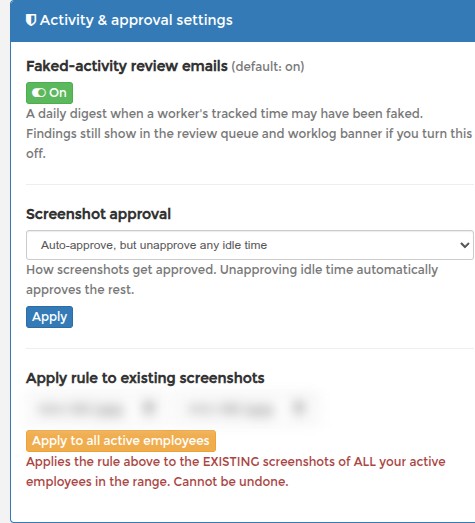
Approvals: Automatic Screenshot Approval
You do not have to approve every screenshot by hand. Go to EDIT PROFILE > Activity & approval settings > Screenshot approval and pick one:
- Manual — I approve screenshots myself (default)
- Auto-approve all screenshots
- Auto-approve, but unapprove heavy idle (> 7 min) and no activity
- Auto-approve, but unapprove any idle time and no activity
Press Apply to save. Unapproving idle time automatically approves the rest, so you only review what actually needs a look.
Both idle options also unapprove every window with no keyboard or mouse activity at all, whatever its idle time. Auto-approve all screenshots still approves everything. Manual time entries are never changed by the rule.
If every window of a worker shows no activity, their app is not counting it. On a Mac this means a missing permission, see Mac: Fixing Activity Tracking Issues. On other systems, update the app.
The rule applies to screenshots that arrive from now on. To cover screenshots you already have, see Approvals: Applying Your Rule to Past Screenshots.