Time Tracking with Screenshots Logo
  • How it works
  • Prices & FAQ
  • Blog
  • Sign Up
  • Log In
  • Contact Us
  • Try SCREENish for free
  1. SCREENish
  2. How it works
  3. Team Overview: Choosing Which Widgets You See

Team Overview: Choosing Which Widgets You See

Every table, chart and strip on the Team Overview page is a widget you can switch off — the page adapts to how you manage, whether that is a daily attendance check, a weekly productivity review, or a monthly overtime report.

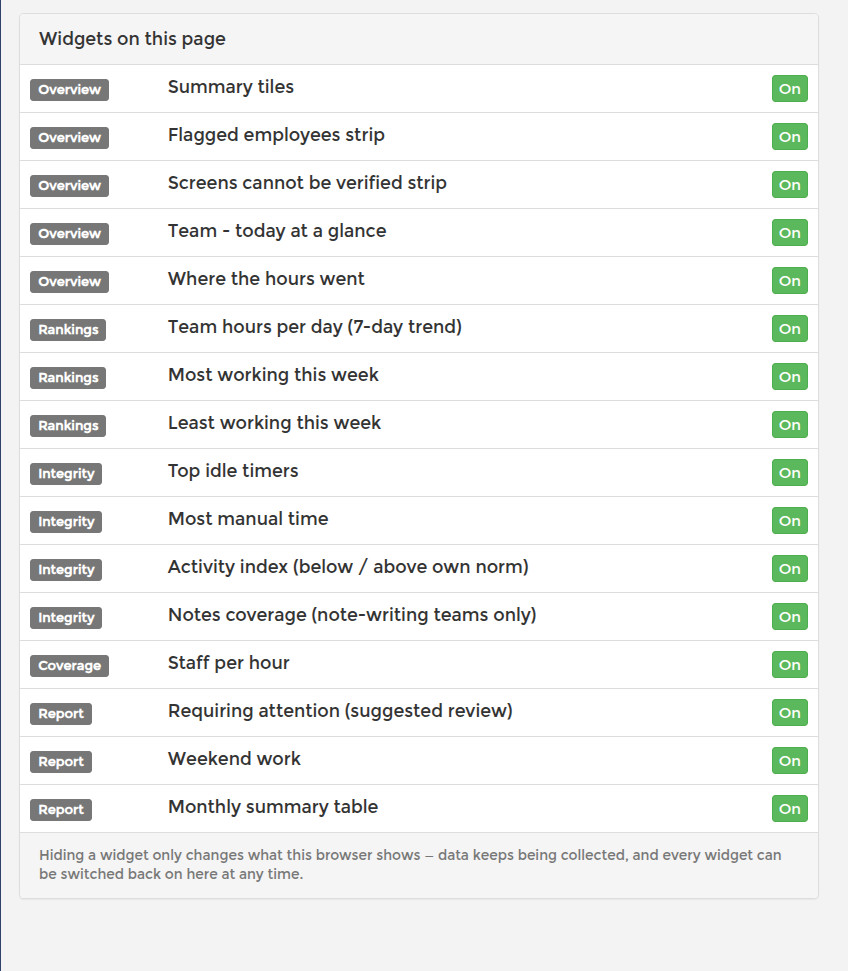
There are two ways to customize. The quick way: every widget has a small gear icon in its corner — click it and the widget disappears immediately. The full picture: the Settings tab lists all widgets grouped by tab, each with a switch, so you can re-enable anything you hid or set up the page in one pass.
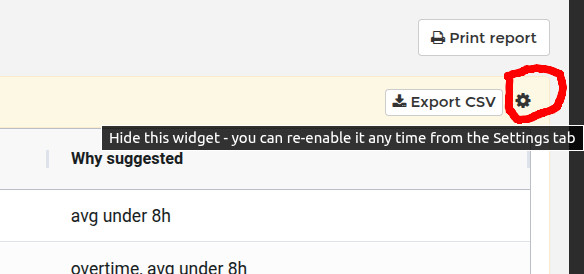
Gear icon that hides a Team Overview widget; it can be re-enabled any time from the Settings tab

Settings tab of the Team Overview page listing every widget by tab with on and off switches

Your choices are saved per browser, so your setup on the office computer and your setup at home are independent, and each manager with dashboard access keeps their own arrangement without affecting anyone else.

Hidden widgets are genuinely off, not just invisible: the dashboard does not even request their data from the server, so a trimmed-down page also loads faster. Switching a widget back on fetches its data on the spot — nothing is lost by experimenting.

See it in your own work logs

SCREENish is free to try — no credit card required.

Start free

← All guides

  • How it works
  • Prices & FAQ
  • Blog
  • Sign Up
  • Log In
  • Contact Us
  • Try SCREENish for free
  • Cookie Settings

Solutions

  • Mouse Jiggler Detection Software
  • Faked Activity Detection
  • Overemployment Detection for Remote Teams
  • Remote Employee Identity Verification
  • Face Recognition Time Tracking
  • Compare Alternatives
  • Feature Guides
  • Blog Articles
  • Pricing & Plans

From the Blog

  • Can Employers Detect Mouse Jigglers?
  • How to Tell If Activity Is Real: What the OS Flags as Fake Input
  • 12 Signs a Remote Employee Is Working Two Jobs
  • Proxy Workers: How to Tell If Someone Else Is Doing the Job
  • GDPR-Compliant Employee Monitoring: A Practical Checklist
  • Best Time Tracking Software with Screenshots (2026)
  • If an Employee Deletes a Screenshot, What Can the Employer Still See?
  • Idle Time Settings: How Many Minutes to Deduct
  • A Fair Mouse-Jiggler Policy for Remote Teams
  • Overemployment in 2026: The Numbers
© SCREENish 2026 All right reserved. By SCREENish.com | Terms of Service | Privacy Policy | Cookie Policy