Time Tracking with Screenshots Logo
  • How it works
  • Prices & FAQ
  • Blog
  • Sign Up
  • Log In
  • Contact Us
  • Try SCREENish for free
  1. SCREENish
  2. How it works
  3. Choosing PC or Phone Tracking for a Project

Choosing PC or Phone Tracking for a Project

Each project you assign to an employee is tracked either from the desktop time tracking application (PC) or from the phone — never both at once. Go to PROJECT > Assign Projects to Employee(s), find the project in the employee's Projects Management table and flip the PC / Phone switch.
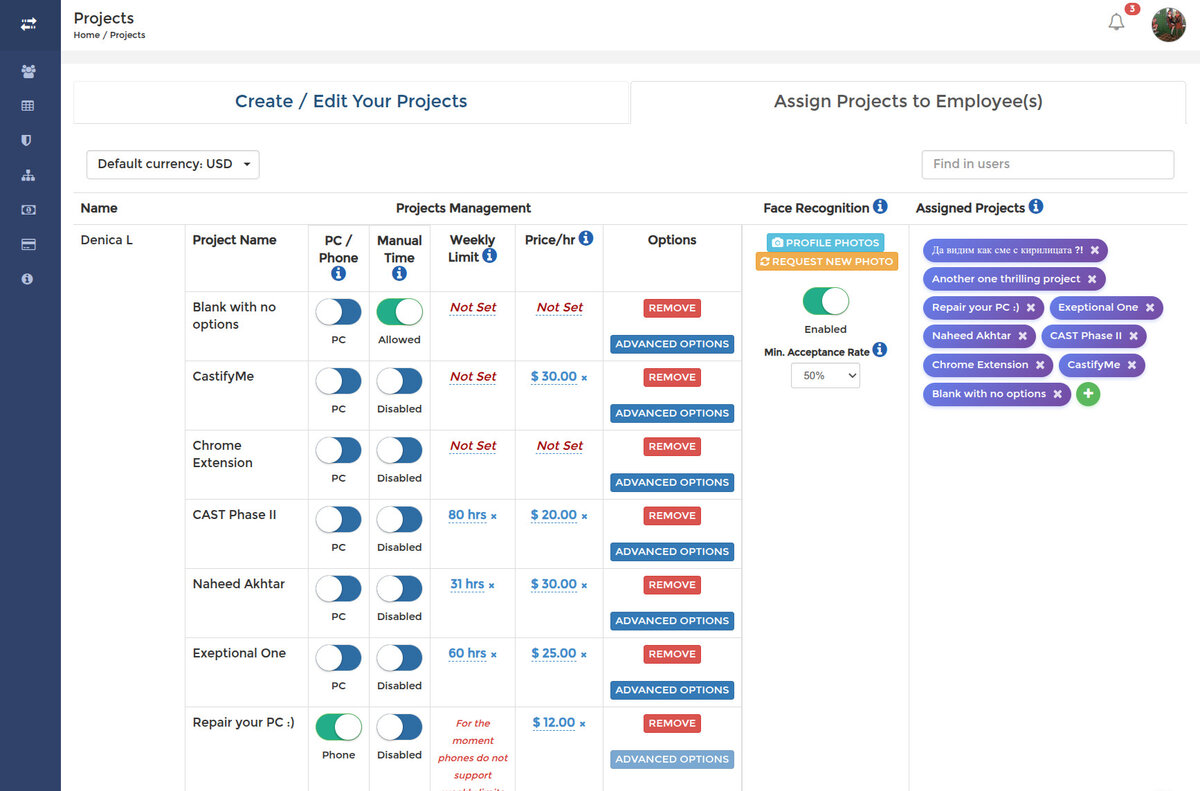
PC / Phone switches per assigned project; a phone project showing that weekly limits are not supported

Phone tracking is meant for mobile teams and records GPS location instead of screenshots — see Android GPS Tracking. Two things to keep in mind about phone projects:

  • Weekly time limits are not supported for phone tracking at the moment.
  • The Advanced Options panel (screenshots, program reports, idle time, distraction rules) applies to PC tracking only.

After switching, ask the employee to log out of the tracking application and back in so the change takes effect.

See it in your own work logs

SCREENish is free to try — no credit card required.

Start free

← All guides

  • How it works
  • Prices & FAQ
  • Blog
  • Sign Up
  • Log In
  • Contact Us
  • Try SCREENish for free
  • Cookie Settings

Solutions

  • Mouse Jiggler Detection Software
  • Faked Activity Detection
  • Overemployment Detection for Remote Teams
  • Remote Employee Identity Verification
  • Face Recognition Time Tracking
  • Compare Alternatives
  • Feature Guides
  • Blog Articles
  • Pricing & Plans

From the Blog

  • Can Employers Detect Mouse Jigglers?
  • How to Tell If Activity Is Real: What the OS Flags as Fake Input
  • 12 Signs a Remote Employee Is Working Two Jobs
  • Proxy Workers: How to Tell If Someone Else Is Doing the Job
  • GDPR-Compliant Employee Monitoring: A Practical Checklist
  • Best Time Tracking Software with Screenshots (2026)
  • If an Employee Deletes a Screenshot, What Can the Employer Still See?
  • Idle Time Settings: How Many Minutes to Deduct
  • A Fair Mouse-Jiggler Policy for Remote Teams
  • Overemployment in 2026: The Numbers
© SCREENish 2026 All right reserved. By SCREENish.com | Terms of Service | Privacy Policy | Cookie Policy