Time Tracking with Screenshots Logo
  • How it works
  • Prices & FAQ
  • Blog
  • Sign Up
  • Log In
  • Contact Us
  • Try SCREENish for free
  1. SCREENish
  2. How it works
  3. When Your Subscription Ends: What Happens to Your Team

When Your Subscription Ends: What Happens to Your Team

A subscription ends in one of two ways: the free trial ends without a card, or a cancelled subscription reaches the end of the period you paid for. The account closes on that day. This guide explains what stops, what is kept and for how long, and how you come back.

Tracking stops

Everyone on the team is deactivated, and delegated managers lose their admin rights. API keys, feed links and webhooks are deleted.

The e-mails stop too

These e-mails stop when the account closes, for you and for your team:

  • the weekly distraction summaries
  • the activity review e-mails
  • the weekly Team Overview report
  • your automatic reports
  • the client invoice reminders

Your automatic reports are kept and start again by themselves when you subscribe again. The weekly Team Overview report also resumes by itself.

What is kept, and for how long

Your data is kept for 365 days: your projects, the work history (the time records) and the list of your former team. After 365 days the team list and the work history are deleted.

Screenshot images are the exception. They are deleted 45 days after they are taken, with or without a subscription.

Coming back

Open Subscription. The slider already stands at the size of your previous team, so the plan covers everyone who was on it. You can move it. Pending invitations count as people here, because each one holds a seat.
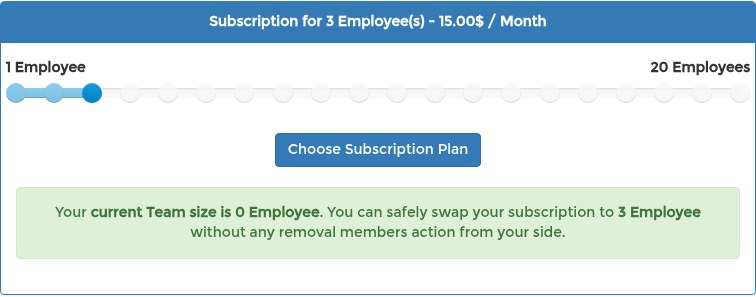
Subscription page of a closed SCREENish account: the plan slider already set to 3 employees, the size of the team before the account closed

Read more: Subscription: The Complete Guide.

Choosing who comes back

After you start the subscription, the Your former team window opens on your dashboard and lets you choose who comes back.

Read more: Restoring Your Former Team After You Resubscribe.

See it in your own work logs

SCREENish is free to try — no credit card required.

Start free

← All guides

  • How it works
  • Prices & FAQ
  • Blog
  • Sign Up
  • Log In
  • Contact Us
  • Try SCREENish for free
  • Cookie Settings

Solutions

  • Mouse Jiggler Detection Software
  • Faked Activity Detection
  • Overemployment Detection for Remote Teams
  • Remote Employee Identity Verification
  • Face Recognition Time Tracking
  • Liveness Detection for Face Recognition
  • Prevent Buddy Punching on a Remote Team
  • Employee Attendance & Overtime Reports
  • Who Starts Work When: Weekly Attendance Grid
  • Compare Alternatives
  • Feature Guides
  • Blog Articles
  • Pricing & Plans

From the Blog

  • Can Employers Detect Mouse Jigglers?
  • How to Tell If Activity Is Real: What the OS Flags as Fake Input
  • 12 Signs a Remote Employee Is Working Two Jobs
  • Proxy Workers: How to Tell If Someone Else Is Doing the Job
  • GDPR-Compliant Employee Monitoring: A Practical Checklist
  • Best Time Tracking Software with Screenshots (2026)
  • If an Employee Deletes a Screenshot, What Can the Employer Still See?
  • Idle Time Settings: How Many Minutes to Deduct
  • A Fair Mouse-Jiggler Policy for Remote Teams
  • Overemployment in 2026: The Numbers
Tracking time since 2015.
© SCREENish 2026 All right reserved. By SCREENish.com | Terms of Service | Privacy Policy | Cookie Policy | Security